OpenClaw vs ChatGPT: What’s the Real Difference? (2026)
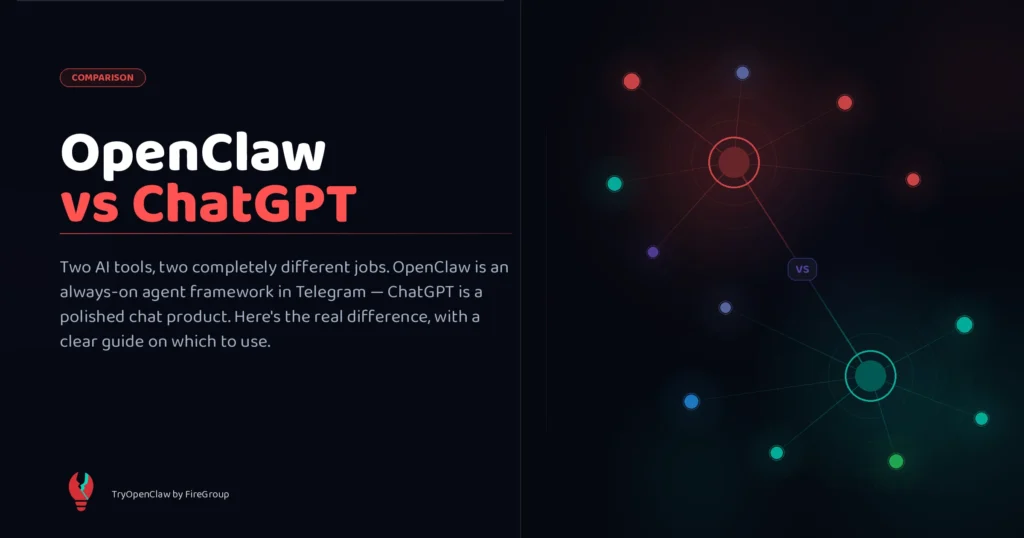
By now, you’ve probably seen both names everywhere: OpenClaw and ChatGPT. If you’re trying to figure out which one is better for your workflow, the short answer is this: ChatGPT is built for conversation and on-demand help, while OpenClaw is built for continuous automation.
That means the real question is not which tool is “better” in general. It’s whether you need a fast AI chat assistant, or an AI Agent that can keep running in the background, connect to your apps, and handle work without you starting every step manually.
Here’s the honest take: they’re not really competing for the same job.
ChatGPT is a conversational chatbot that operates in a browser or dedicated app, requiring you to prompt it for one-off tasks. Meanwhile, OpenClaw is an open-source, autonomous AI agent that runs in the background on your computer or server, using messaging apps like WhatsApp or Telegram to execute tasks proactively.
One feels like having a brilliant colleague you can chat with anytime. The other feels like hiring a tireless digital employee who keeps working even when you’re not watching.
Quick Recap: OpenClaw vs ChatGPT at a Glance
Before diving deeper, here’s a quick side-by-side comparison of how OpenClaw and ChatGPT differ in real-world use.
|
Feature |
OpenClaw |
ChatGPT |
|
Type |
Open-source autonomous AI agent framework |
Closed-source AI assistant (SaaS) |
|
Setup |
Self-hosted (technical setup required) |
Ready to use immediately, no setup required |
|
AI Model |
Bring your own model (GPT, Claude, Gemini, local,…) |
OpenAI GPT models built-in |
|
Autonomous task execution |
Full agentic loop, runs without supervision |
Agent mode available but session-based |
|
Memory |
Long-running operational memory |
Session-based + optional persistent memory (limited) |
|
Interface |
Telegram, WhatsApp, Slack, Discord, web app |
Browser, iOS, Android, desktop app |
|
Pricing |
Free software; pay for hosting API keys |
$8-$200/month depending on your plan |
|
Privacy |
Full control (self-hosted) |
Data owned by OpenAI |
|
Best for |
Developers, power users, business automation operators |
Everyone – students, writers, professionals |
|
Technical skill needed |
Medium to high |
Low |
What Is OpenClaw?
OpenClaw is an open-source autonomous AI agent framework that became one of the fastest-growing AI projects of 2026.
Instead of opening a chat window and typing prompts, OpenClaw runs continuously in the background – connecting to your files, apps, browser, messaging platforms, and APIs, then takes action on your behalf. Crucially, it’s not its own AI model. It’s an orchestration layer, you bring the brain (GPT, Claude, Gemini, or a local model), and OpenClaw gives it hands, memory, and the ability to execute real-world actions.
Some pros and cons of using OpenClaw are:
OpenClaw Pros
- Truly autonomous: runs 24/7, proactively handles tasks without you prompting it each time
- Full privacy and data control: self-hosted, so your data stays on your infrastructure
- Highly customizable: choose your AI model, extend with 100+ modular skills (plugins), build custom workflows
- Model flexibility: switch freely between GPT, Claude, Gemini, or local models
- Lives inside tools you already use: operates through Telegram, Slack, WhatsApp, Discord
OpenClaw Cons
- High setup complexity: requires Docker, VPS, API keys, and technical configuration
- Maintenance-heavy: debugging workflows and monitoring token usage takes ongoing time
- Unpredictable costs: runaway automations can cause API bills to spike without warning
- Reliability varies: agents can fail or hallucinate, especially in complex workflows
- Security risks: broad access to your filesystem, inbox, and credentials creates real attack surfaces
What Is ChatGPT?
ChatGPT started as a conversational AI and has evolved into a full AI workspace. Today it can browse the web, run code, analyze files, connect to apps (Gmail, Google Drive, GitHub, Slack), and through its ChatGPT Agent feature, complete multi-step tasks – all from one clean interface.
ChatGPT Pros
- Zero setup: open a browser and you’re ready in 30 seconds
- Consistently reliable: polished, well-maintained, rarely breaks
- Accessible to everyone: no technical knowledge required
- Flat, predictable pricing: no surprise bills
- Excellent for writing, research, and coding
ChatGPT Cons
- Reactive by nature: you initiate every session; no background autonomous operation
- Less customizable: you work within OpenAI’s ecosystem
- Data goes to OpenAI: not ideal if privacy or data sovereignty matters
- Agentic features still maturing: complex end-to-end automation is still unreliable
- Advanced features behind paid tiers: Deep Research and Agent mode need Plus or Pro
OpenClaw vs ChatGPT: Core Differences (Full Breakdown)
To understand which tool fits you best, you first need to understand how differently they are designed.
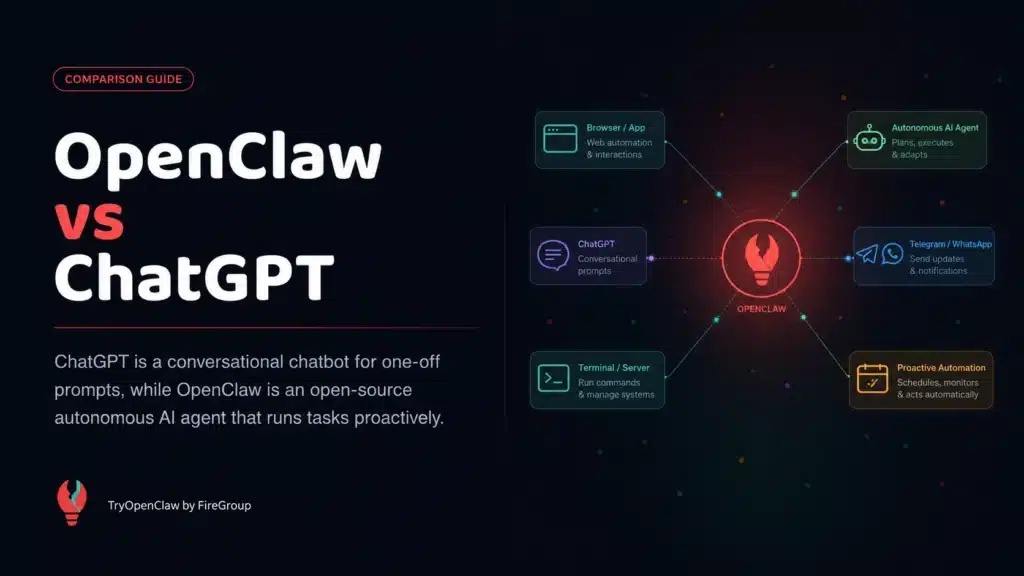
1. Workflow: Reactive Chat vs. Persistent Digital Employee
This is the biggest difference between the two tools.
ChatGPT is reactive. Even with its Agent feature, it works within sessions you initiate, so you have to open the chat, assign a task, and it works while you’re present. Close the tab, the work stops.
OpenClaw runs on a “heartbeat”, a continuous loop checking inboxes, task queues, scheduled jobs, and APIs even while you sleep. Configure it on a Sunday afternoon, wake up Monday to find it has already monitored a competitor’s pricing page, summarized overnight emails, and flagged what needs your attention.
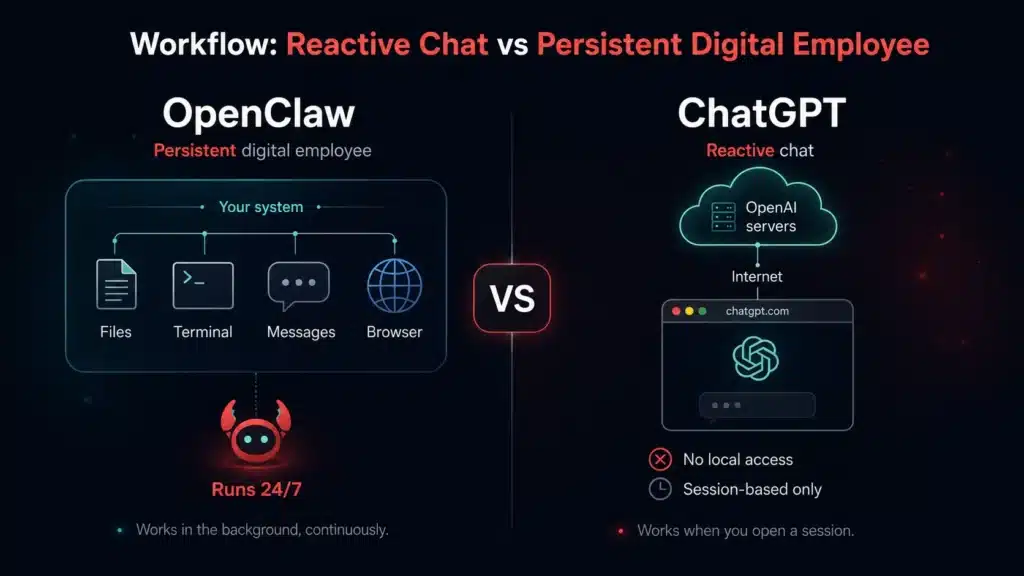
Practical examples where this matters:
- Monitor a competitor’s website for changes and alert you immediately
- Check your support inbox every hour and draft responses
- Pull weekly metrics every Monday and compile a report automatically
ChatGPT can’t do these without you manually triggering each session. OpenClaw handles them autonomously, around the clock.
Winner: OpenClaw for continuous background operation. ChatGPT for predictable, on-demand sessions.
2. Setup & Control: Ready in 60 Seconds vs. Full Infrastructure Ownership
ChatGPT takes 60 seconds. Create an account, open the chat, type. No installation, no configuration, no infrastructure to manage.
OpenClaw requires setting up a VPS, installing Docker, configuring API keys, setting environment variables, and wiring up your messaging interface. Even experienced developers report the setup takes hours with ongoing maintenance. If you’re ready to start, our step-by-step installation guide walks through the full process. Managed hosting services like RunMyClaw and ClickClaw ($9–30/month) lower the barrier, but it’s still meaningfully more complex than a SaaS product.
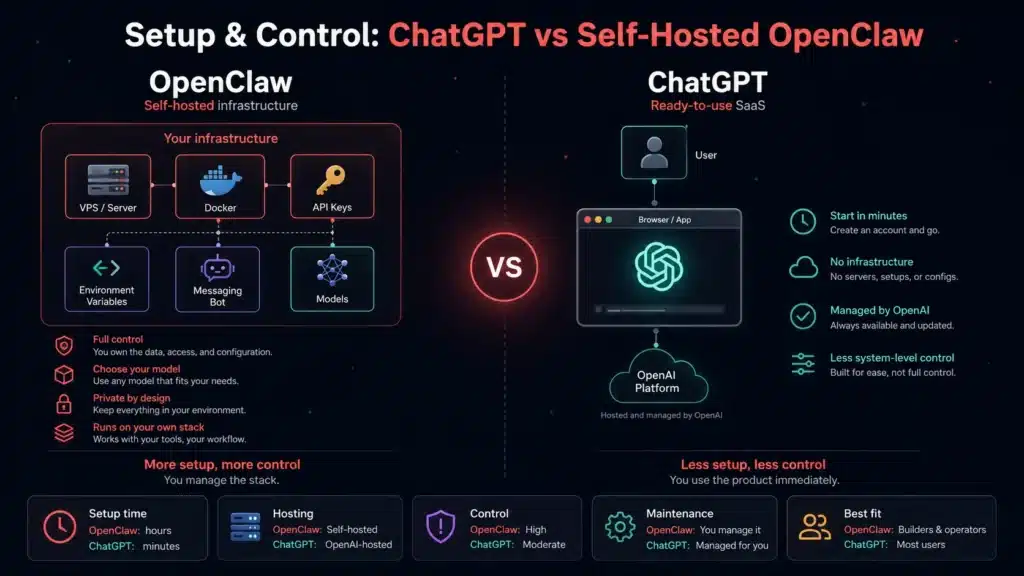
Winner: ChatGPT for ease of use. OpenClaw for full control over your infrastructure.
3. Model Flexibility: Locked Ecosystem vs. Bring Your Own AI
ChatGPT runs on OpenAI’s models – GPT-5.5 and other variants. Everything integrates seamlessly, but you’re locked into OpenAI’s roadmap.
OpenClaw is model-agnostic. Connect GPT 5.5, Claude 4.6, Gemini Flash 3.5, or local open-source models like Llama or DeepSeek. You can even route cheap models (GPT-4o-mini, Gemini Flash 2.5) to simple tasks and premium models to complex reasoning – improving both quality and cost efficiency. When a better model launches tomorrow, you can switch immediately.
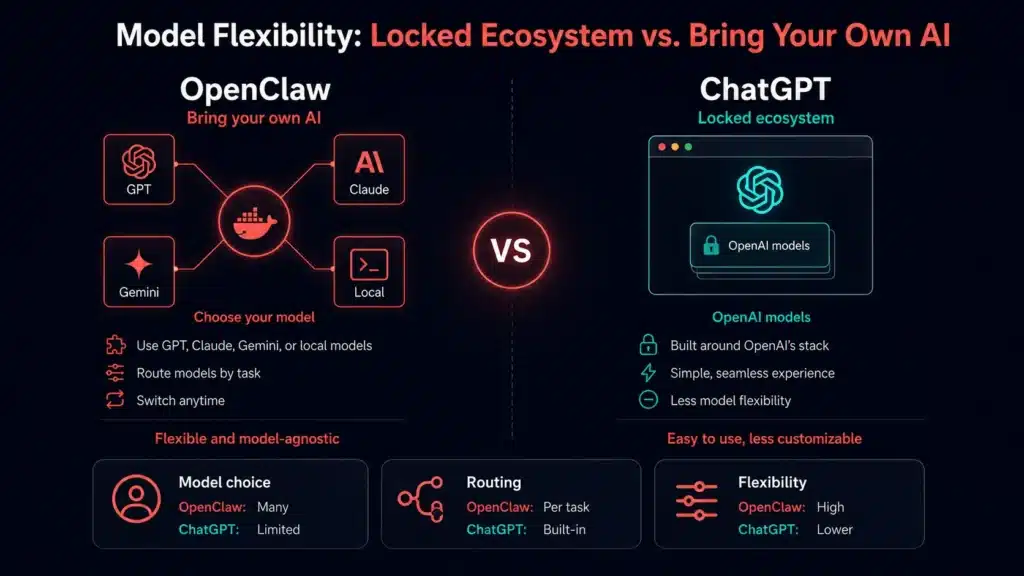
Winner: OpenClaw for flexibility. ChatGPT for seamless out-of-the-box model quality.
4. Capabilities: What Each Tool Can Actually Do
ChatGPT’s Agent can browse the web, click buttons, fill forms, run code, analyze files, and connect to your apps via integrations. It’s strong for: building slide decks, analyzing spreadsheets, summarizing emails, drafting reports from multiple sources. Where it still struggles: fully autonomous end-to-end operations. Sensitive actions like sending emails, making purchases that require your approval, and complex workflow chains can derail.
OpenClaw’s agentic loop – receive objective → plan → select tools → execute → evaluate → retry → continue – is designed for tasks that run over hours or days, not minutes. It accesses shell commands, filesystem operations, browser automation, and APIs without needing permission at every step. The tradeoff: broader autonomy means broader failure risk, and the consequences of a misconfigured automation running unattended for a week can be significant.
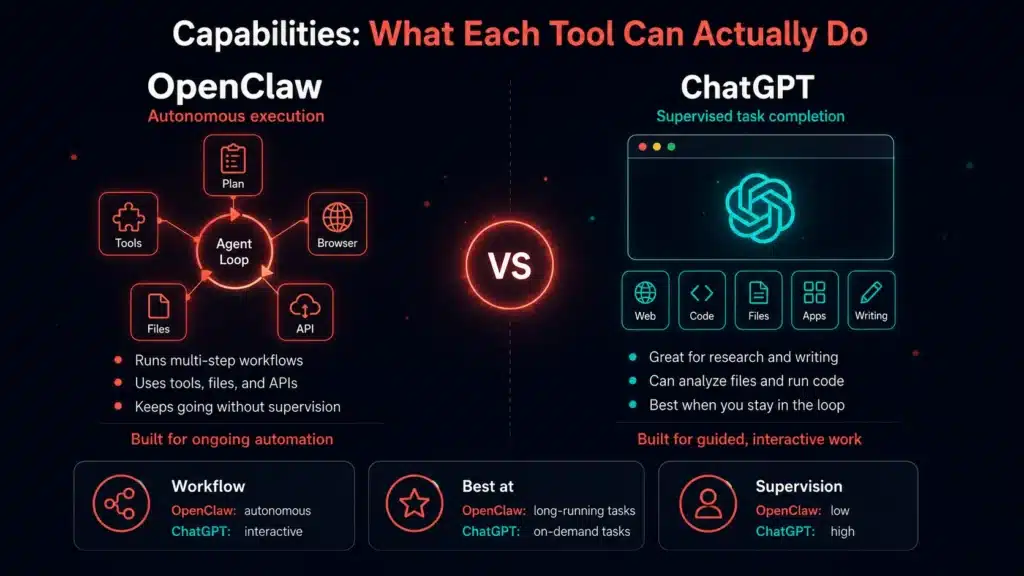
Winner: OpenClaw for deep autonomous execution. ChatGPT for polished, supervised task completion.
5. Memory and Persistent Context
ChatGPT remembers your preferences, writing style, and project context across sessions so you don’t have to re-explain yourself every time you start a new chat. Clean, well-integrated, and opt-in.
OpenClaw tracks not just preferences but active task state and workflow outcomes over long time horizons. It doesn’t just remember your writing style, it remembers it emailed three prospects yesterday, one replied, and needs to follow up today. That’s operational memory, not preference memory.
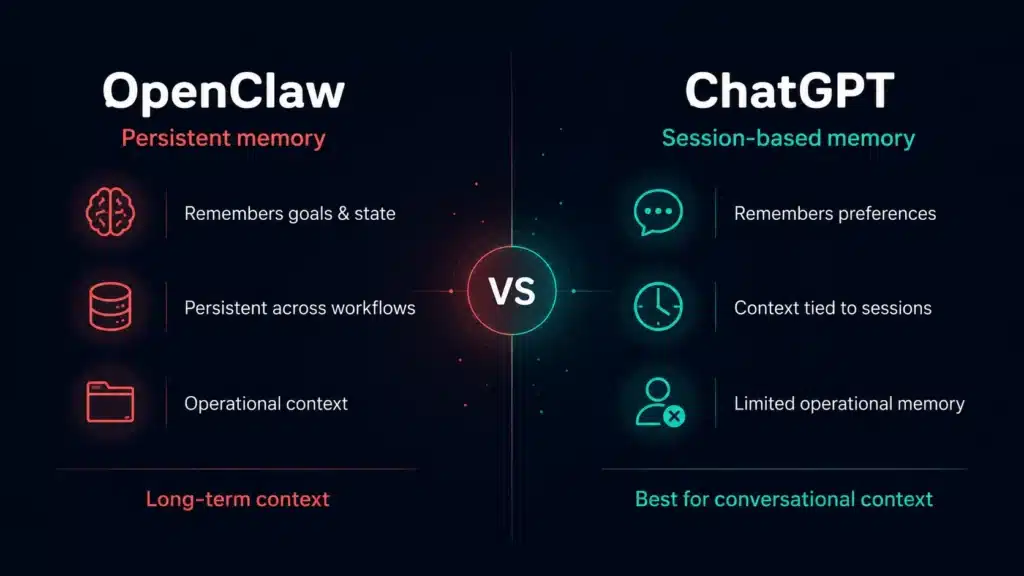
Winner: ChatGPT for conversational memory. OpenClaw for long-running workflow state.
6. Research and Content Creation
ChatGPT’s Deep Research mode searches across many sources, reads full articles, and synthesizes comprehensive source-cited responses. For market research, competitive analysis, SEO research, or content creation tasks, it feels closer to working with an analyst than a traditional chatbot. The workflow is highly user-driven: users typically move from research → brief → content creation inside a single interface using one prompt or a short chain of prompts.
OpenClaw approaches research differently. Instead of focusing on one-off requests, it excels at building proactive, multi-step research workflows that run continuously in the background. Users can configure pipelines that monitor topics, update research briefs on a schedule, summarize new findings, and even route different stages of the workflow to different models or APIs. For example, you might use Gemini for crawling and data collection, then pass the results to Claude Sonnet or GPT for briefing and content generation.
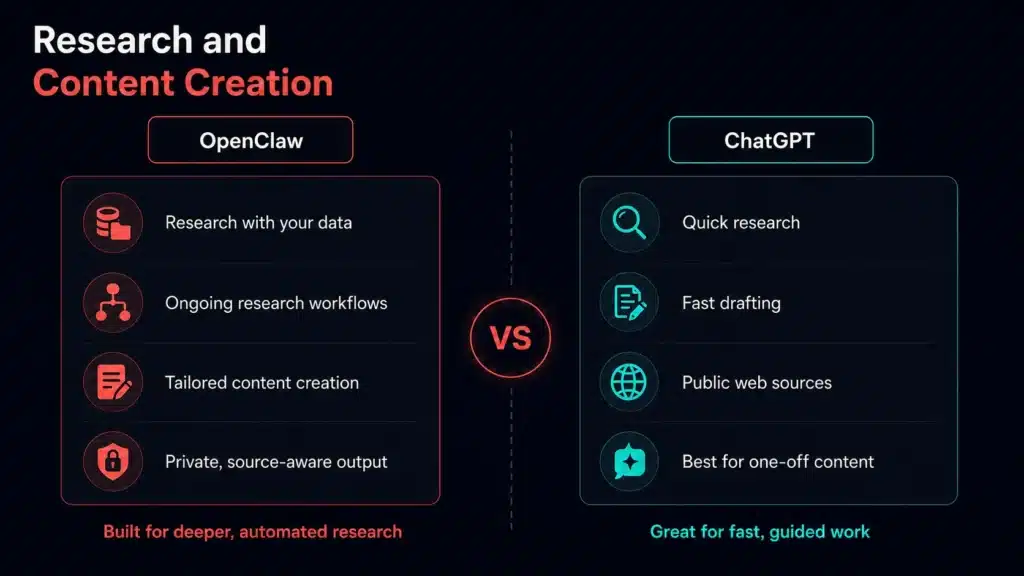
Winner: ChatGPT for turnkey research workflows. OpenClaw for configurable long-term research automation.
7. Customization and Extensibility
OpenClaw wins this decisively. Every layer is configurable: your AI model, your skills (browser automation, shell access, Gmail, GitHub, CRMs, and 100+ others), your workflows, your hosting, and even which model handles which type of task. If a workflow doesn’t exist, you can build it.
ChatGPT offers Custom GPTs, Projects and Apps, which are genuinely useful, but you’re customizing within OpenAI’s sandbox. You can’t swap models, build deeply custom execution flows, or integrate arbitrary internal systems.
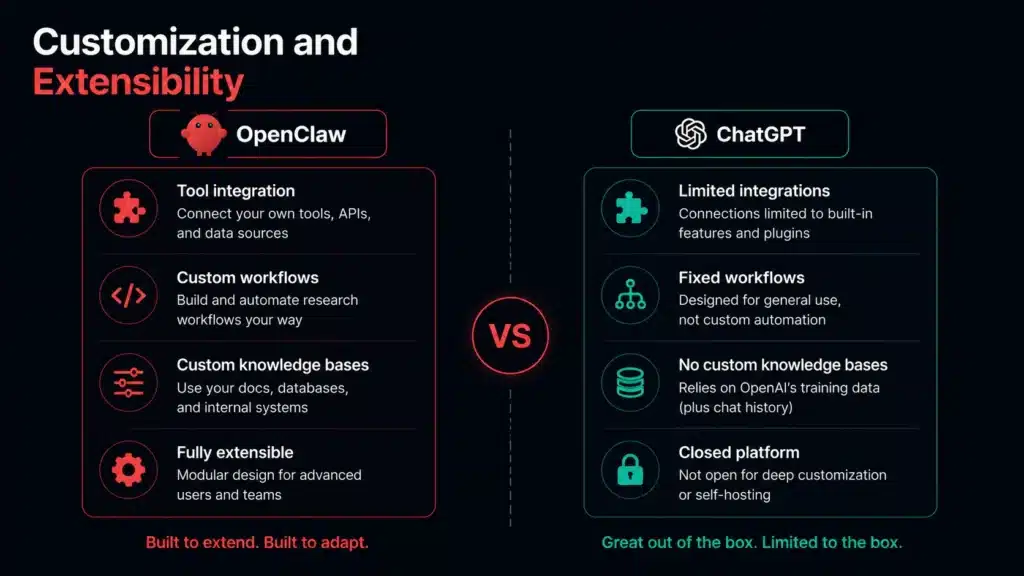
Winner: OpenClaw is significantly more powerful for teams building custom AI infrastructure.
8. Privacy, Security, and Data Control
OpenClaw keeps everything on your infrastructure. Your conversations, files, agent actions, and workflow data stay on servers you control – a significant advantage for regulated industries or teams handling sensitive client data. Caveat: OpenClaw’s broad access to your systems (filesystem, browser, inbox, credentials) creates real security risks if poorly configured. Prompt injection, credential exposure, and unintended file operations are legitimate concerns.
ChatGPT routes everything through OpenAI’s servers. For most businesses, OpenAI’s privacy practices are reasonable. For strict compliance requirements, consider the enterprise plan or evaluate self-hosting.
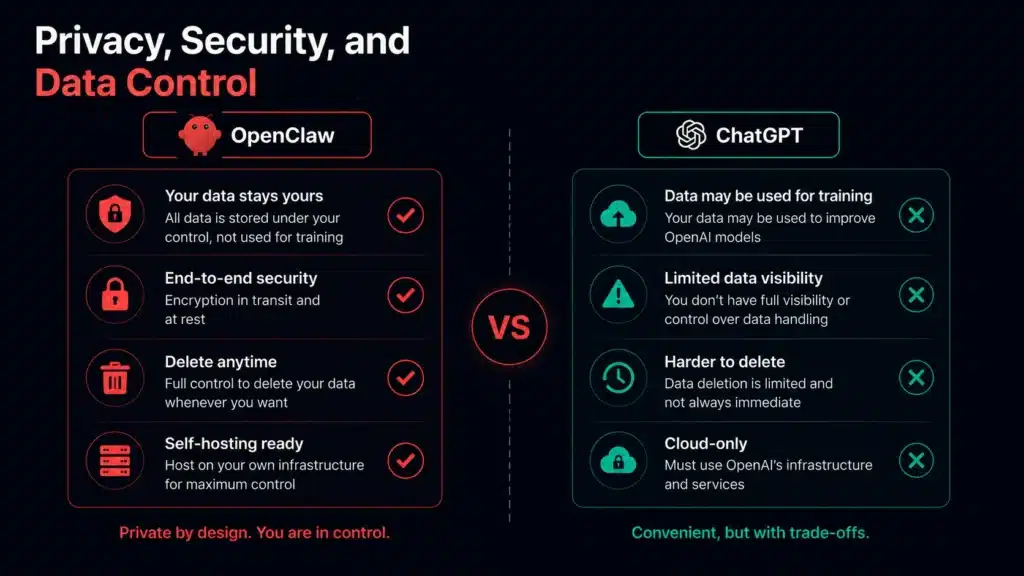
Winner: OpenClaw for data sovereignty – assuming you configure it securely.
Pricing and Total Cost of Ownership
Not the pricing page. The real operational cost.
ChatGPT is simple: pay a flat monthly subscription and everything is handled for you. No servers, no APIs, no maintenance. Plus starts at $20/month, while Pro plans can reach $100-200/month for heavier usage and higher limits.
OpenClaw works differently. The software itself is free, but your actual costs depend entirely on the models and infrastructure you choose. Run lightweight local models through Ollama and you might spend almost nothing. Use GPT-5 or Claude Opus heavily, and costs can quickly climb into the hundreds per month through API usage alone.
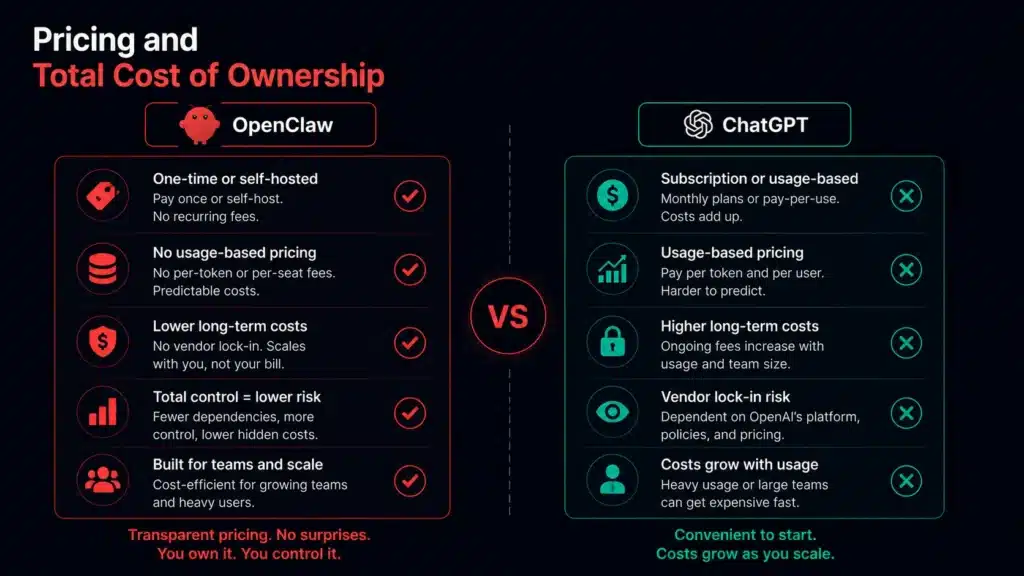
That flexibility is both OpenClaw’s biggest advantage and its biggest trap.
You can optimize for cost, performance, privacy, or autonomy in ways ChatGPT simply does not allow. But you are also responsible for the operational side: hosting, updates, monitoring, debugging, security, and runaway token usage when agents misbehave.
Winner: ChatGPT wins for cost predictability. OpenClaw wins for potential long-term value – but only with disciplined workflow design.
Which One Should You Choose?
Choose ChatGPT if you want AI that just works. You open a tab, ask a question, get an answer, and move on. It’s ideal for writing, brainstorming, coding, research, and everyday productivity without dealing with setup, servers, or APIs.
OpenClaw is built for a different kind of user. Instead of acting like a chatbot, it behaves more like a persistent AI assistant that can monitor, automate, and run workflows 24/7 for you. It’s better suited for developers, automation-heavy users, and teams that want AI integrated directly into their systems and messaging apps.
ChatGPT makes more sense if you…
- Want the fastest path from prompt to result
- Need reliable help with writing, research, or coding
- Prefer predictable monthly pricing
- Don’t want to manage infrastructure or debug workflows
OpenClaw makes more sense if you…
- Want AI agents running continuously in the background
- Need autonomous workflows, scheduled monitoring, or inbox automation
- Care about model flexibility, self-hosting, or data control
- Are comfortable managing APIs, infrastructure, and automation logic
Many people end up using both
A surprisingly common setup is using ChatGPT for fast, interactive work and OpenClaw for long-running automation behind the scenes.
One is optimized for conversation. The other is optimized for execution.
The Low-Friction Way to Use OpenClaw
OpenClaw is incredibly powerful, but the reality is that most people never make it past the setup phase. Managing VPS deployments, connecting APIs, configuring models, debugging integrations, and maintaining everything long-term can quickly turn into a full side project on its own.
That’s why TryOpenClaw.io is a practical option if you want OpenClaw without managing the setup yourself. You can start on a private cloud instance, get going in about 2 minutes, and use OpenClaw without needing to clone anything, install an environment, handle dependencies, or provide an API key up front.
It’s a simpler way to use OpenClaw if you want the benefits of always-on agents, private access, and easy app connections without turning deployment into its own project.
For people who want the power of OpenClaw but not the operational headache, it’s one of the easiest ways to get started.
Summary
ChatGPT is the better choice for most people. It’s polished, instantly accessible, reliable, and keeps improving. If you’re not technical and just want AI to help you work smarter, ChatGPT is the clear answer.
OpenClaw is the better choice for people who want AI to genuinely do things rather than just advise on them. If you’re a developer or technical team that wants an always-on autonomous agent running workflows, monitoring the web, and operating inside Slack or Telegram, OpenClaw opens up a category of capability ChatGPT simply doesn’t match today.
The mental model that sticks: ChatGPT is a brilliant colleague you consult. OpenClaw is a tireless digital employee you deploy.
Neither is universally better. The right tool is the one that fits how you actually work.
Frequently Asked Questions
Is OpenClaw free?
The software is open-source and free. But running it isn’t, you’ll pay for hosting ($5–15/month for a VPS) and AI API usage. Casual use typically runs $10–25/month total; heavy business automation can reach $100–500+/month.
Can OpenClaw replace ChatGPT?
For most users, no. They solve different problems. ChatGPT is better for on-demand conversational use; OpenClaw is better for autonomous background automation. They’re more complementary than competitive.
Which is better for SEO and content creation?
It depends on your goals. ChatGPT is generally better for turnkey SEO research and one-off content creation, while OpenClaw is stronger for proactive long-term content workflows that continuously monitor topics, update research briefs, and automate multi-step pipelines across different models.
Does OpenClaw work with ChatGPT’s AI?
Yes. OpenClaw is model-agnostic – connect it to OpenAI’s GPT, Anthropic’s Claude, Google’s Gemini, or local models. You bring the AI; OpenClaw provides the execution layer.
Which is better for non-technical users?
ChatGPT, without question. OpenClaw requires Docker, server setup, and ongoing troubleshooting. ChatGPT works in a browser with no setup at all.
Can I run OpenClaw on my own computer?
Yes, locally, on a VPS, or through managed hosting. See our full installation guide for a step-by-step walkthrough.
What’s the cheapest way to run OpenClaw?
A budget VPS ($5–15/month) combined with low-cost models like Gemini Flash, DeepSeek, or GPT-4o-mini can keep total costs surprisingly low. Many users run OpenClaw for under $15/month by choosing efficient models and lightweight workflows. Just make sure to set hard API spending caps – this is essential, not optional.
Related Posts
Cách nhờ OpenClaw tìm lỗi trong code
OpenClaw v2026.10.5 có gì mới?