OpenClaws update troubleshooting usually comes down to one of a few familiar problems: a dependency changed, a port conflicts with another service, or an agent starts behaving differently after the update. If you are running OpenClaw in a managed environment, the goal is not to rebuild everything from scratch, but to isolate where the break happened and restore a stable workflow quickly.
Key takeaways
- Most update issues are not random; they usually trace back to version changes, dependency drift, or an unstable runtime state.
- First separate instance problems from workflow problems so you do not debug the wrong layer.
- A managed private cloud setup reduces the usual update pain points such as Docker setup, port conflicts, and environment mismatch.
- If an agent becomes unstable after an update, the fastest path is to verify the instance, then test the workflow in a controlled way.
- When the issue keeps returning, support is often faster than repeated manual fixes.
What usually breaks after an OpenClaw update

After an update, the most common failure is not the update itself but the environment around it. A new version can expose a dependency mismatch, change expected behavior in a workflow, or leave an agent in an unstable state if the runtime did not restart cleanly.
In self-managed setups, people also run into port conflicts, Docker issues, and version drift across related components. That is why an update can look simple on paper but turn into a chain of small technical problems in practice.
What TryOpenClaws handles for you during updates
TryOpenClaw is designed to remove the operational work that usually makes updates painful. You get a private cloud instance that is created automatically, so you do not need to clone a repo, run Docker, or spend time resolving setup details before you can test the new version.
Because each agent runs in its own isolated environment, an update issue is less likely to spill over into other work. The service also emphasizes self-recovery when something goes wrong, which helps reduce downtime when an agent becomes unstable after a change.
How to check whether the issue is in the instance or the workflow
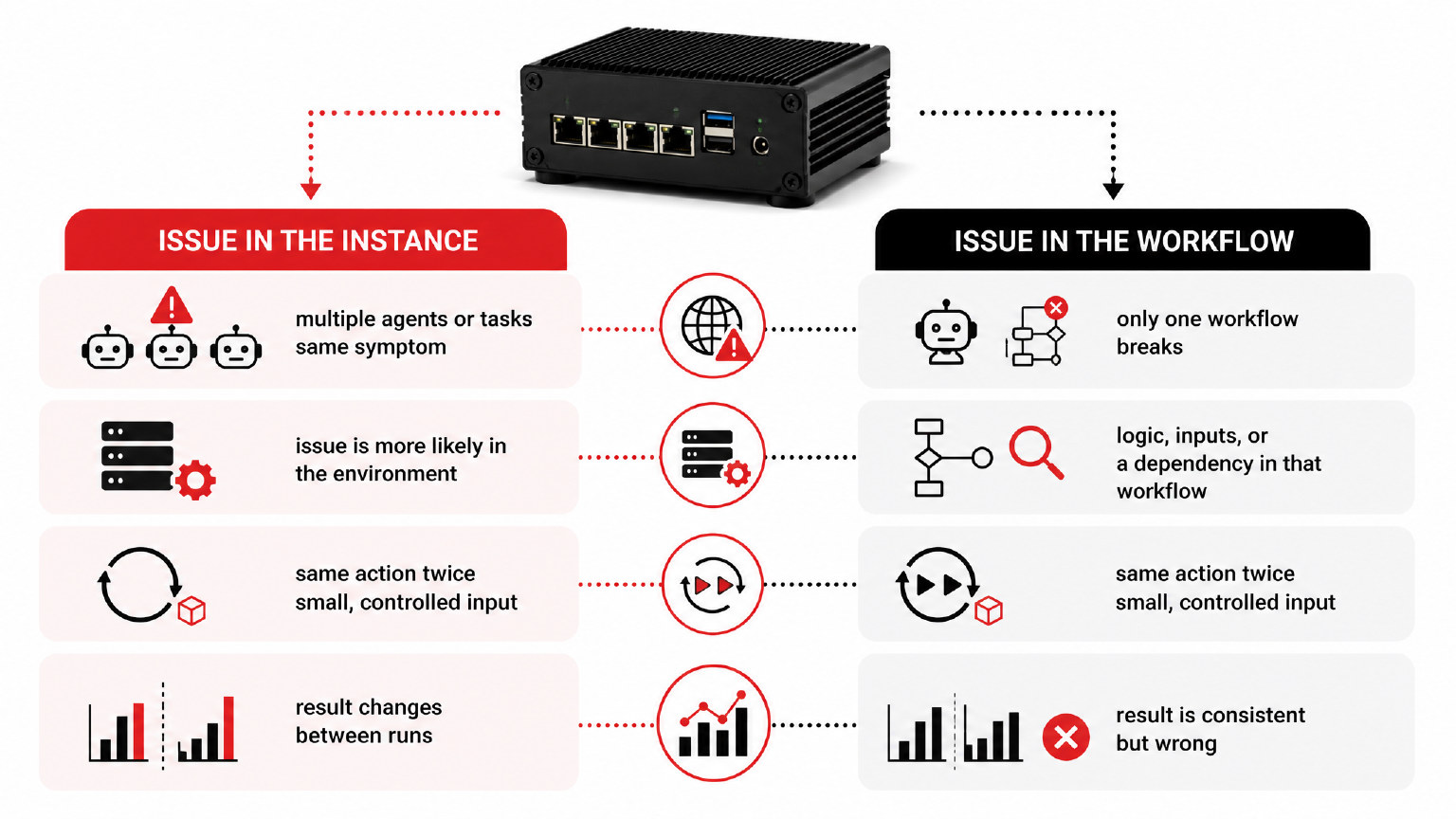
The fastest way to debug an update problem is to ask a simple question: is the instance itself unstable, or is only one workflow failing? If multiple agents or tasks show the same symptom, the issue is more likely in the environment. If only one workflow breaks, the logic, inputs, or a dependency in that workflow is usually the better place to inspect.
Try the same action twice with a small, controlled input. If the result changes between runs, that points to instability in the instance. If the result is consistent but wrong, the workflow itself probably needs adjustment.
What to try first when an update leaves an agent unstable
Start with the least disruptive checks first. Refresh the agent state, confirm the workflow inputs are still valid, and verify that the agent is running in the expected environment. If the update introduced a new dependency or changed a required setting, fix that before changing the workflow logic.
When you are using a managed service, it is usually better to restore a known-good state than to keep stacking manual changes. That approach is especially useful for developers and builders who need the agent back online for CSV or Excel analysis, market research, Telegram or Discord moderation, or content workflows.
When the update problem needs support instead of self-fixing
Some update issues are not worth chasing line by line. If the agent keeps failing after you have confirmed the inputs, checked the instance, and retried the workflow, support is the faster route. That is especially true when the issue affects multiple tasks or returns after every restart.
In a managed setup, getting help can be more efficient than rebuilding the environment yourself. The point is to keep the automation moving, not to spend hours debugging infrastructure that should already be handled for you.
FAQ
Why does an OpenClaw update sometimes break an agent?
Because an update can change dependencies, runtime behavior, or the agent state. Even if the code is fine, the surrounding environment may no longer match what the workflow expects.
How do I know if the problem is the instance or the workflow?
Test the same action with a small input. If several agents fail the same way, look at the instance. If only one workflow fails consistently, inspect that workflow first.
What should I check first after an update?
Check whether the agent is stable, whether the inputs are still valid, and whether any required dependency or setting changed. Start with the simplest recovery step before rewriting logic.
Can a managed environment reduce update issues?
Yes. A managed private cloud setup removes much of the manual work around Docker, ports, and environment setup, which are common sources of update trouble.
When should I contact support?
Contact support when the issue keeps returning, affects multiple tasks, or still appears after you have checked the instance and retried the workflow.
Related Posts
OpenClaw tìm lỗi code như thế nào
OpenClaw cloud chạy workflow 24/7 thế nào