OpenClaw browser relay is easiest to understand when you use it in a managed cloud instance, not on a machine you have to assemble first. If you want browser control for an OpenClaw agent without cloning a repo, wiring up Docker, or debugging port conflicts, that is the path this guide focuses on.
For developers and builders, the real question is usually not whether browser automation works, but how fast you can get to a stable setup. In TryOpenClaw, the relay runs inside a private cloud environment that is ready to use after signup, so you can log in, assign work to the agent, and move on to the task itself.
This matters because local setup is often where the friction starts: version mismatches, dependency issues, and browser state that breaks after an update. Here, the focus is on what the relay connects to, when local Chrome still makes sense, and which setup steps you do not need to worry about when the instance is managed for you.
If you are comparing relay options, the useful lens is simple: choose the path that gives your agent browser access with the least operational overhead. That is where a managed cloud instance changes the experience from maintenance work to actual automation.
What OpenClaw browser relay lets you do without setup

It lets you give an agent browser control inside a managed cloud instance, so you can start automating sooner and skip the local setup work that usually slows the first run. Instead of spending time on Chrome installation, extension wiring, host processes, or environment fixes, you log in and use the relay in the instance that is already ready for use.
That matters when your goal is practical browser work: opening pages, moving through tabs, filling forms, checking flows, or letting an agent handle repetitive web tasks. You still get browser access, but the operational burden shifts away from your machine and into a hosted environment that is already configured for the workflow.
For many builders, the real value is not the relay itself but what it removes from the path to use. You do not need to clone a repo, manage Docker, debug port conflicts, or keep a local Chrome setup aligned with every update just to test browser control. You can focus on the task you want the agent to complete, not on making the relay run.
That said, local Chrome can still make sense in specific cases. If your workflow depends on your own signed-in browser profile, local data, or a machine-specific environment, then keeping Chrome on your side may still be the better fit. The point here is not that local setup never matters; it is that a managed cloud instance lets you avoid it when you do not need that level of control.
How TryOpenClaw removes the setup, port, and dependency work
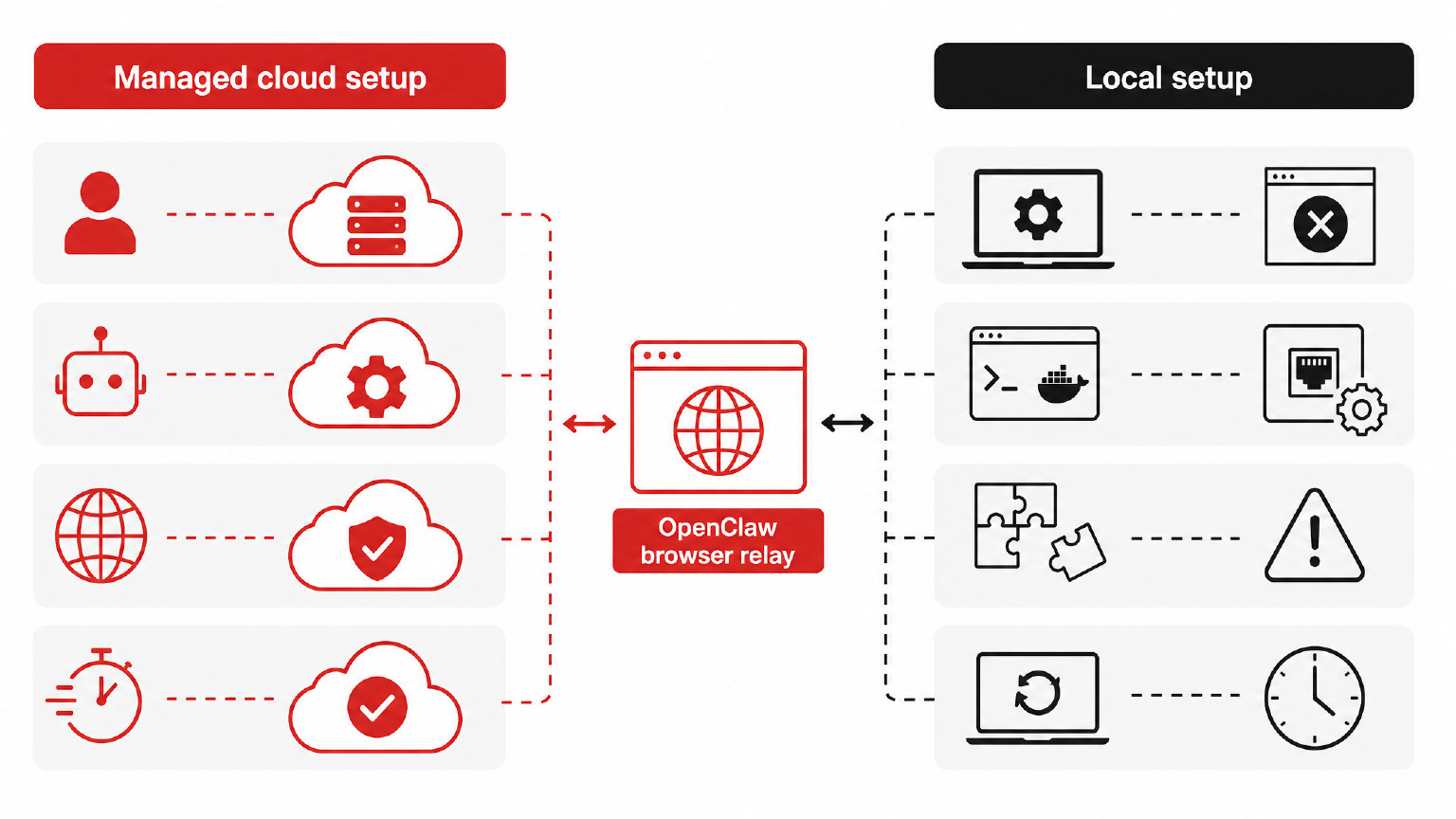
TryOpenClaw removes the part of OpenClaw browser relay that usually slows people down: setting up Chrome, handling ports, and chasing dependency issues. Instead of asking you to clone a repo, run Docker, and debug a local machine, it gives you a managed cloud instance that is ready to use after signup. You log in, hand work to the agent, and move straight into browser control and automation.
That matters because the relay is rarely the hard idea. The hard part is making the browser, the agent, and the host machine agree on versions, permissions, and network access. In a managed private cloud instance, those pieces are already aligned, so you are not spending time on environment drift or on fixing a relay that worked yesterday and breaks after an update today.
The practical result is simple: the browser relay connects through TryOpenClaw’s hosted OpenClaw environment, while the setup burden stays off your machine. You do not need to prepare a separate host, open or map ports yourself, or maintain the dependency stack that local relay workflows usually require. If your use case truly depends on a local Chrome profile, then local Chrome still has a place; otherwise, the managed path keeps the workflow lighter and more predictable.
For most developers and builders, the main win is not just convenience. It is removing the failure points that usually appear before the first useful task runs. With TryOpenClaw, there is no manual instance provisioning, no extension-host pairing on your own laptop, and no after-hours troubleshooting because one package version changed under you. The environment is already prepared, so browser control becomes part of the workflow instead of a project of its own.
Which tasks fit OpenClaw browser relay best
OpenClaw browser relay fits tasks where an agent needs to act inside a browser, not just read web pages. That usually means workflows with logins, repeated clicks, form filling, tab switching, and small decisions that depend on what is already on screen. In TryOpenClaw, those tasks are a better fit because the managed cloud instance is already ready when you sign in.
The strongest use cases are practical ones: checking dashboards, collecting data from web apps, moving information between tabs, and handling browser-based tools that do not expose a clean API. It also works well for content and operations work, such as updating CMS entries, reviewing search results, comparing competitor pages, or following a multi-step workflow that would be tedious by hand. The common thread is simple: the agent needs a real browser session, not a scripted scrape.
It is also a good fit when the task is interactive but still bounded. For example, a developer may want to validate a signup flow, inspect how a page behaves after login, or move through a sequence of web actions while keeping control inside OpenClaw. A builder may use it to gather market signals from several pages, or to support Telegram and Discord operations that depend on browser access rather than direct API work.
What matters most is that the browser relay is strongest when the value comes from the browser itself: authenticated sessions, visible UI state, and human-like navigation across pages. If the work is mostly browser-based and repeatable, the relay can turn it into a reliable agent task. If the job needs a local browser for a specific reason, such as a machine-tied profile or a tool that must stay on your own device, then local Chrome still has a role. For everything else, the managed cloud instance keeps the workflow cleaner.
Why private instances and isolated agents matter
Private instances matter because browser control is only useful when the agent can act without interfering with anything else. In a managed cloud instance, the relay is tied to one environment, so the browser state, session data, and task history stay scoped to that agent instead of being mixed with other work. That makes the workflow easier to reason about, easier to recover, and less likely to break after a change elsewhere in the system.
Isolation also reduces the kinds of problems that usually show up in shared setups: one task overwriting another, a stale session carrying over, or an update affecting every job at once. When each agent runs in its own environment, you can test browser actions, retry a failed step, or let one workflow continue while another is paused. For developer and builder use cases, that separation is often the difference between a demo that works once and a setup you can trust day after day.
This is also where managed cloud use differs from local Chrome in a practical way. Local Chrome is still relevant when the browser must stay on your machine, but it is not required just to get reliable relay control. If your goal is to hand tasks to an OpenClaw agent and keep the environment clean, a private instance gives you the browser control you need without asking you to maintain the surrounding infrastructure yourself.
What Free and Starter include in TryOpenClaw
Free and Starter both give you a ready OpenClaw instance, full access to OpenClaw, and a managed environment that is already running when you sign up. That means you can log in, assign work to an agent, and start using browser control without first cloning a repo, wiring up Docker, or fixing local setup issues. For many builders, that is the real value: the relay is available in a private cloud instance, so the browser side is part of the service rather than a machine you need to maintain.
The practical difference is in what you do not have to handle yourself. You do not need to manage port conflicts, version mismatches, dependency drift, or the kind of update problems that can leave an agent unstable after a change. You also do not need to request an API key for the plans mentioned here, and token AI is included so you can begin testing workflows sooner. If you are comparing plans for browser relay use, the question is usually less about basic access and more about how quickly you want a private environment that is already prepared for automation.
Free is useful when you want to evaluate the relay in a managed cloud instance before committing to a larger workflow. Starter is the same idea with a more practical path for ongoing use, especially if you are building repeatable browser tasks for research, content work, or operations. In both cases, the point is the same: the browser relay connects through an instance that is already set up, so you can focus on the task instead of the infrastructure.
When OpenClaw browser relay is the wrong fit
OpenClaw browser relay is not the right choice when you need a local Chrome session, direct control of a machine you already own, or a workflow that depends on software installed outside the managed instance. In those cases, the browser relay can still help with browser actions, but it is not a substitute for a setup that lives on your own desktop or workstation.
If your work depends on signed-in browser state tied to a specific profile on your computer, or on extensions, files, and devices that only exist on that machine, local Chrome is still the safer path. The same is true when your team needs to debug browser behavior at the operating-system level, inspect a problem in the exact environment where it happens, or keep a browser session under direct hands-on control.
It is also the wrong fit when the task is not really a browser task at all. If you mainly need code execution, data processing, or a custom service that talks to your own systems through APIs, then browser relay adds a layer you do not need. In that case, the cleaner path is to use the managed instance for the parts OpenClaw handles well, and keep the rest of the workflow outside the browser.
What you do not need to do is rebuild the whole stack just to test the relay. You do not need to clone a repo, run Docker, open ports, or spend time chasing version conflicts before you know whether browser control is actually the bottleneck. Start with the managed cloud instance, confirm the browser task itself is the issue, and only move to a local Chrome setup when the workflow truly requires it.
That is the practical rule: use the relay for browser work that benefits from a managed environment, and use local Chrome only when the browser must stay on the same machine as the rest of your setup. If the task is about convenience, isolation, and faster start-up, the cloud instance is usually enough. If the task is about device-specific control or deep local debugging, it is not.
FAQ
How does the OpenClaw browser relay connect in a managed cloud instance?
It connects through the hosted OpenClaw environment inside the managed instance. That keeps the browser control tied to the ready-to-use cloud setup instead of requiring you to build the host on your own machine.
When would I still need local Chrome?
You still need local Chrome when your workflow depends on your own signed-in browser profile, local data, or a machine-specific environment. In those cases, keeping Chrome on your device can be the better fit.
What setup steps can I skip with a managed instance?
You can skip cloning a repo, wiring up Docker, handling host processes, and debugging port conflicts. You also avoid the local setup work around Chrome installation, extension wiring, and dependency issues.
Do I need to provision the instance myself before using the relay?
No, the managed instance is ready to use after signup. You log in and hand work to the agent instead of spending time on manual provisioning.
Is the relay meant for browser tasks that need a real session?
Yes, it is meant for tasks that need an actual browser session, such as logins, tab switching, form filling, and multi-step web workflows. It is less about reading pages and more about letting the agent act inside them.
Related Posts
Install OpenClaw