To separate business AI agents effectively, use different agents when workflows need different data access, and group workflows when their access needs match. Map each workflow’s owner, inputs, outputs, and data access before deciding how to organize agents.
Key takeaways
- Different access needs are a reason to use separate agents; matching needs are not.
- Map workflow owners, inputs, outputs, and data access before assigning agents.
- Choose a boundary—workflow, team, or access—that limits cross-workflow access without needless duplication.
- Distinct agent environments can support workflows that require separate access.
Separate agents when workflows need different access
Use separate business AI agents when teams or workflows need different access to data; keep workflows together when their access needs match. This boundary helps prevent one workflow from receiving information or interacting with systems that belong to another, without creating extra agents that add no useful separation.
For example, suppose a sales workflow uses customer contact details while a finance workflow handles invoices and payment records. If the teams should not share those records, assign the workflows to separate agents and provide each with only the access it needs. The same applies when two workflows connect to different business systems or send results to different teams: separate them if sharing access would expose data or actions beyond the intended workflow.
Different teams alone do not always require different agents. If two teams use the same data, systems, and outputs, splitting their work may add maintenance without meaningfully limiting access. Base the decision on what each workflow can read, change, and pass on—not simply on how many teams are involved.
Before creating a boundary, identify the specific access difference it is meant to address. Consider whether an agent needs a particular data source, whether it can make changes in a connected system, and who should receive its outputs. If those needs differ between workflows, separate agents provide a clearer boundary; if they match, keeping the work together avoids needless duplication. For a closer look at access considerations, see how agent data access works.
Map each workflow before assigning agents

Before assigning agents, map each workflow’s owner, inputs, outputs, and required data access. Then group workflows only when those needs match; a shared team name or similar task is not enough if the workflows use different data or send results to different places.
Record Who Owns Each Workflow
Name the person or team responsible for each workflow, including who approves changes and handles exceptions. For example, a sales team may own lead follow-up while finance owns invoice review, even if both workflows use customer records. Clear ownership helps teams verify that an agent’s access supports the work and gives them a contact when the process changes.
List the Data Each Workflow Needs
Write down the systems and specific data an agent needs to complete each workflow, rather than listing every source the team can access. Note whether it reads information, creates or edits records, or needs access to particularly sensitive data. A support workflow might need customer messages and order status, while a finance workflow may also require payment records. Keep those requirements distinct in the map so similar workflows are not grouped based on task labels alone.
Note Where Outputs Are Sent
Record what the agent produces, where it sends or saves the result, and who receives it. Outputs might include a draft email, an updated spreadsheet, or a task routed to a team queue. Check whether a result contains data that should stay within its originating workflow. If two workflows share the same owner, inputs, access needs, and destinations, grouping may be reasonable; if one differs, record that difference before deciding how to organize agents.
Choose separation by workflow, team, or access
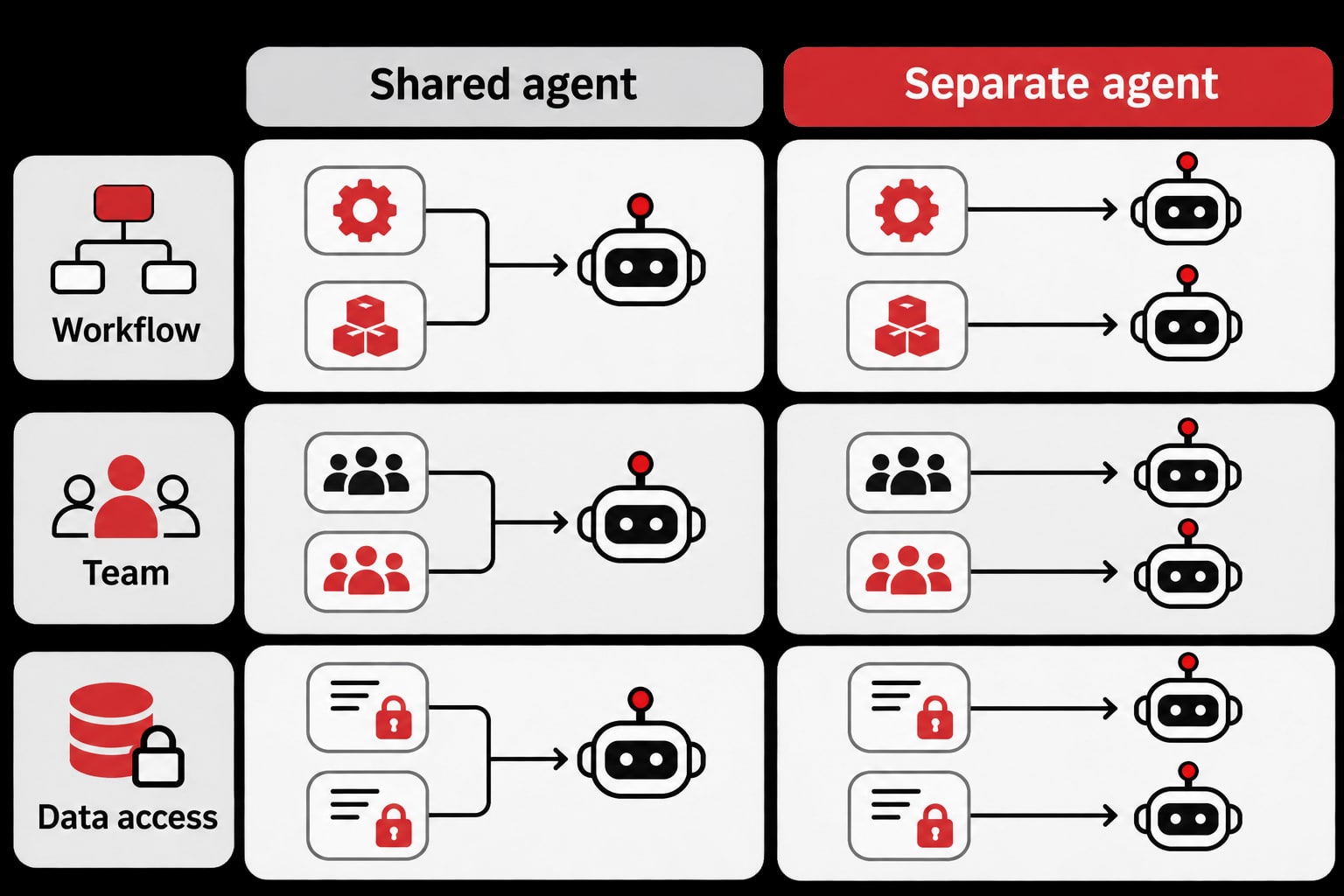
Choose an agent boundary based on what needs to stay separate: the workflow, the team, or the data access. A workflow boundary suits distinct processes, a team boundary suits groups with different responsibilities, and an access boundary suits cases where one workflow needs information another should not see. Use the narrowest boundary that prevents unwanted access without creating agents that perform the same work under identical permissions.
| Boundary | Use it when | Access benefit | Avoid needless duplication by |
|---|---|---|---|
| Workflow | Processes have different inputs, outputs, or responsibilities, even if the same team runs them. | An agent for one process does not automatically handle another process’s work or data. | Keeping workflows together when their data access and handling requirements match. |
| Team | Different groups own the work and should not share the same agent context or access. | Each team can work through an agent aligned with its responsibilities rather than a shared agent spanning groups. | Sharing an agent when teams have the same access needs and a shared process. |
| Data access | Workflows need different permissions or handle information that should remain restricted, regardless of team ownership. | Agents can be separated around the information they are allowed to use. | Avoiding a separate agent for every task when tasks require the same data access. |
These boundaries can overlap, but they do not always need to. For example, one team may run two workflows with different access requirements; separating by access can be more useful than creating a general-purpose team agent. Conversely, if two teams perform the same workflow with the same data needs, a separate agent for each team may add maintenance without meaningfully limiting access.
Before deciding that a boundary requires another agent, check whether the work truly needs different access or simply has a different name or owner. When separate agents do have to run at once, estimate their resource needs alongside the access decision; agent capacity planning can help you assess that operational side.
Keep agent environments distinct where access differs
OpenClaw on cloud fits workflows that need separate environments because each agent runs in its own environment. A business can assign one agent to a particular workflow and another agent to work with a different set of data, rather than placing both workflows in the same agent’s environment.
For example, a team could use one agent for routine internal requests and another for work involving sensitive records. Keeping those agents in distinct environments creates a practical boundary between the workflows. The assignment should reflect the access map: give each agent the data and destinations needed for its own work, and avoid connecting it to unrelated workflows by default.
This approach is useful when workflows have different owners, handle different information, or send results to different places. It gives teams a way to organize their agents around those boundaries without treating every task as a reason to create another agent. If two workflows require the same data access and follow the same handling rules, assigning them to separate agents may add duplication without providing a meaningful access distinction.
Before assigning a workflow to a separate agent, check what information it reads, what it produces, and where those outputs go. Then confirm that the agent’s connections and permissions support that workflow without exposing data to another team’s work. If requirements change, review the boundary again—for example, when a workflow begins handling more sensitive inputs or sharing outputs with a new team.
With OpenClaw on cloud, teams can use distinct agent environments to keep workflows with different access needs apart. The useful boundary is the one that matches how the business handles its data; creating extra agents where access needs are the same can make workflows harder to manage without improving separation.
Start with the smallest separation that works
Start with the smallest separation that keeps each workflow’s data access appropriate. Before changing your setup, compare the proposed agent groups with your access map: combine workflows whose owners, inputs, outputs, and access needs align, and separate them where a mismatch could expose data to a team or workflow that does not need it.
Use a short review to check the grouping in practice:
- Trace each workflow: Confirm which data the agent reads and where its outputs go. Include connected systems and people who receive the results.
- Check shared access: For workflows assigned to one agent, verify that every team involved is meant to access the same data and outputs.
- Test sensitive cases: Review whether a workflow handles information that other grouped workflows do not need. If so, separate it and limit its access accordingly.
- Recheck after changes: Repeat the review when a workflow gains a new owner, data source, or destination, since its access needs may no longer match its group.
A useful test is whether combining two workflows would give either one access it does not require. If the answer is yes, separate them; if their work and access needs match, an additional agent may add complexity without improving the boundary. This keeps the setup focused on actual differences rather than creating a separate agent for every task.
The right separation is the smallest one that keeps access aligned with each workflow. If your business needs to run agents in distinct environments, consider OpenClaw on cloud and map each agent to the workflow it should handle.
Related Posts

Bộ prompt viết code bằng trợ lý AI hiệu quả cho lập trình viên
Dữ liệu doanh nghiệp được bảo vệ thế nào trên OpenClaw cloud?