Yes, you can delete OpenClaw data, but you should back up any workspace files or state you may need before removing them. Some data is just temporary context, while other files may contain agent work, uploaded documents, workflow outputs, or configuration you will not be able to recreate easily.
If you are asking “Can I delete OpenClaw data” because you are worried about stored files, the safest approach is to understand where the data lives first. Local OpenClaw installs, self-hosted deployments, and managed OpenClaw instances do not always handle cleanup in the same way.
This guide focuses on user-safe deletion: what kinds of OpenClaw data are usually worth reviewing, how hosted instance cleanup differs from local uninstall steps, and when deleting workspace files can cause more trouble than it solves.
Your OpenClaw Instance Keeps Data Separate
Yes, you can delete OpenClaw data, but the safe approach starts with knowing which instance and workspace the data belongs to. In a managed OpenClaw setup, your files, agent state, sessions, and generated outputs should be treated as part of your own working environment, not as loose files shared across unrelated users.
With TryOpenClaw, each OpenClaw environment runs as its own instance on private cloud infrastructure. That separation matters because cleanup decisions can be scoped to your workspace and agent activity instead of requiring you to inspect a full local machine, Docker setup, hidden service, or mixed development folder.
Practically, this means you should review data at the workspace level before removing state. A CSV used for analysis, a repo copied into a task, a prompt history, or an agent output may all be useful later even if you no longer need the current run. Deleting everything just because an agent behaved unexpectedly can remove context that would help you debug, reproduce, or continue the workflow.
Instance separation also reduces the risk of affecting someone else’s environment, but it does not replace basic data hygiene. Before you remove stored files or reset state, make a backup of workspaces you may need, confirm which agent used them, and avoid treating hosted cleanup the same way as a local uninstall command.
What OpenClaw Data You May Want To Delete
The OpenClaw data worth deleting is usually the data tied to your work, not the OpenClaw software itself. If you are cleaning up a hosted instance, start by identifying workspaces, uploaded files, generated outputs, and agent state that no longer need to be retained. These are the items most likely to contain business context, prompts, files, exports, or intermediate results from automation tasks.
For example, a developer may want to remove temporary repo copies, test files, or failed build artifacts created during coding tasks. A business user may want to delete CSV or Excel files used for analysis, draft SEO content, video scripts, translated documents, or research notes created by an agent. Community workflows may also leave behind moderation logs, message drafts, or source files used for Telegram or Discord tasks.
State data is different from normal files. It can include session context, task memory, runtime metadata, or records that help an agent continue a workflow. Removing it may be useful when you want a fresh start, but it can also make an agent lose useful context. Before deleting anything, separate disposable output from workspaces you may need later, then back up the latter first.
How Data Deletion Works In A Managed Instance
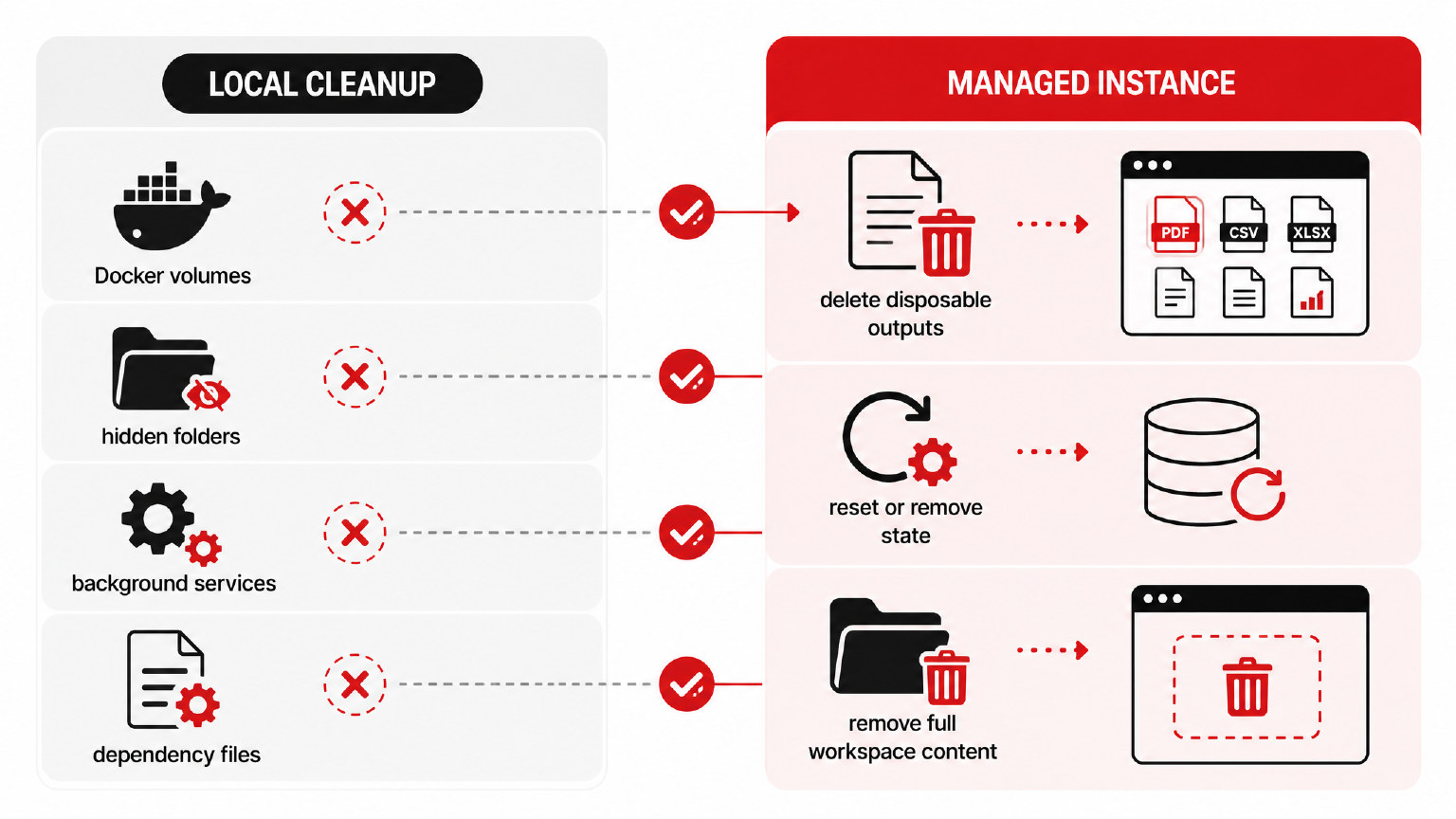
In a managed OpenClaw instance, data deletion is handled inside the hosted environment rather than on your local machine. That means you are not cleaning up Docker volumes, hidden folders, background services, or dependency files yourself. You are removing files, workspace content, or state from the private instance that runs your OpenClaw agents.
Yes, you can delete OpenClaw data in a managed instance, but the safe path is to treat workspace files and agent state as separate categories. Workspace files are the visible project materials you may still need: uploaded documents, generated outputs, CSV or Excel files, research notes, scripts, drafts, and similar assets. State is the operational layer that helps an agent continue from context.
For hosted OpenClaw, deletion should happen from the instance or account controls provided by the service, not by attempting local uninstall commands from generic OpenClaw guides. In a TryOpenClaw setup, each agent runs in its own environment, so cleanup is scoped to that environment instead of being mixed with another user’s workspace or another system.
The practical rule is simple: delete disposable outputs when you no longer need them, reset or remove state when you want a fresh agent context, and only remove full workspace content after you have exported anything important. This keeps deletion useful without turning a routine cleanup into accidental data loss.
Check These Items Before Deleting Data
Before you delete anything, treat OpenClaw data like working project material, not temporary cache. The safest approach is to confirm what the agent has produced, what the workspace still contains, and whether any state is needed to continue a workflow later.
Use this quick check before removing files, state, or a full workspace:
- Export important outputs first. Download CSV/Excel results, generated content, code changes, research notes, translations, or any file you may need outside the instance.
- Separate reusable work from disposable runs. A failed draft or one-off analysis can usually go; a workspace that contains prompts, scripts, datasets, or final deliverables should be reviewed first.
- Check whether the agent still needs context. If an ongoing workflow depends on prior state, deleting it may force you to rebuild instructions, reconnect files, or rerun earlier steps.
- Confirm the scope of deletion. Removing an output file is different from clearing agent state or deleting the workspace content that produced it.
- Pause active workflows. Avoid deleting data while an agent is still processing files, writing results, or using the workspace for a longer task.
In a managed OpenClaw instance, this check matters because the environment is designed to let you work without managing the underlying setup. You do not need to think about Docker volumes, ports, or hidden local paths, but you still need to decide what work product should be kept before cleanup.
If your question is “Can I delete OpenClaw data?”, the answer is yes, but the practical safety step is always the same: back up workspace files and outputs before removing state or workspace content.
When Deleting Data May Not Be Enough
Deleting OpenClaw data removes the selected state or workspace content from that environment, but it may not remove copies that already left the instance. This matters most when an agent has produced outputs, processed uploaded files, or interacted with external services during a workflow.
Before treating deletion as final cleanup, check whether the same information exists somewhere else:
- Downloaded files on your computer or a teammate’s device.
- Exports copied into spreadsheets, docs, repos, tickets, or internal tools.
- Messages already sent to Telegram, Discord, email, or another connected channel.
- Generated content that was published, shared, or reviewed outside OpenClaw.
- Workflow outputs recreated automatically because a scheduled task or agent instruction still exists.
In those cases, removing OpenClaw state is only one part of the cleanup. You may also need to delete external copies, revoke access in connected services, or stop the workflow that created the data in the first place. If you still need an audit trail, debugging context, or reproducible results, do not delete workspace files until you have saved the version you may need later.
TryOpenClaw Reduces Manual Cleanup Risk
Yes, you can delete OpenClaw data, but the safest path is to back up any workspace you may need before removing state. The harder part is usually not the deletion itself. It is knowing which files matter, which state belongs to the agent, and which copies may still exist outside the instance.
TryOpenClaw reduces that risk by running OpenClaw in a managed private cloud environment instead of leaving you to maintain a local setup on your own machine. You do not have to clone a repo, keep Docker stable, resolve port conflicts, or guess whether an update changed how the agent stores state. Your instance is created for you, and each agent runs in its own separate environment.
That separation makes cleanup easier to reason about. If you want to remove files from an OpenClaw workspace, you can focus on the data inside that instance rather than hunting through hidden folders, background services, local dependencies, and old config left by previous installs. For hosted OpenClaw users, this is the practical difference: less manual cleanup, fewer places to check, and a lower chance of deleting the wrong thing.
Still, deletion should be deliberate. Before removing state or workspace files, save anything you may need for debugging, reporting, reproducibility, or handoff to another workflow. If the data has already been exported to CSV, copied into a document, sent to Telegram or Discord, or used by another service, clean up those destinations too.
The short answer is simple: you can delete OpenClaw data, but do not treat deletion as a replacement for a backup plan. With a managed instance, TryOpenClaw helps reduce the infrastructure side of cleanup so you can make a safer decision about what to keep, what to remove, and what to disconnect.
FAQ
Does deleting OpenClaw data also uninstall OpenClaw?
No, deleting OpenClaw data is not the same as uninstalling OpenClaw. Data cleanup removes selected workspace content or agent state, while uninstalling a local setup or closing a hosted instance is a separate action.
Can I recover OpenClaw workspace files after deleting them?
You should assume deleted workspace files may not be recoverable unless you exported or backed them up first. Save important outputs, datasets, drafts, scripts, and notes before removing workspace content or state.
Does resetting agent state remove uploaded files too?
Not necessarily, because agent state and workspace files should be treated as separate categories. Use the instance or account controls available to remove the specific content you want deleted.
Do I need to delete files from my laptop if I used a managed OpenClaw instance?
Only if you downloaded, exported, or synced OpenClaw files to your laptop. Cleaning up the managed instance does not automatically remove copies that already exist outside that environment.
Is it safe to delete data from a failed agent run?
Usually yes, if the files are disposable outputs and you do not need them for debugging or reproduction. If the failed run contains useful prompts, logs, inputs, or intermediate results, back them up before cleanup.
What if OpenClaw data was shared to another tool before deletion?
You need to manage those external copies separately. Removing OpenClaw state or workspace files will not automatically delete messages, exports, tickets, docs, repos, or published content outside the instance.
Related Posts

Triển khai AI agent cho doanh nghiệp cần lưu ý gì?

Trợ lý AI hỗ trợ lập trình viên độc lập những công việc gì