OpenClaw Docker requirements only matter if you plan to self-host OpenClaw. If your goal is to try agents, assign work, and start automating today, a managed OpenClaw environment can skip the local Docker path entirely.
That difference is easy to miss because most install guides focus on cloning a repo, running Docker, and debugging your own machine.
Key takeaways
- Docker is part of the self-hosting path, not a universal requirement for using OpenClaw.
- Self-hosting gives you more infrastructure control, but it also adds ports, dependencies, updates, and local troubleshooting.
- TryOpenClaw gives you a ready private cloud instance, so you can log in and work with agents without installing Docker.
- Managed hosting is usually faster for builders, SaaS teams, and automation users who care more about workflows than infrastructure.
- Self-hosting still fits when you need deep control over runtime, deployment policy, or internal infrastructure.
Docker is only required when you self-host OpenClaw
Docker is required when you run OpenClaw on infrastructure you manage yourself. In that setup, Docker provides a predictable runtime so the OpenClaw services, dependencies, and related processes can run in containers instead of depending directly on whatever is installed on your machine.
For a developer, that can be a good path. You can inspect the repo, tune the runtime, decide where services run, and connect OpenClaw to your own deployment process. But it also means you own the checklist: Docker installed and running, enough local resources, open ports, compatible versions, environment variables, persistent storage, and update handling.
If you only want to evaluate OpenClaw agents, the Docker checklist is not the same thing as the product experience. It is the self-hosting experience. That distinction matters because many users search for OpenClaw Docker requirements when they actually need to know whether Docker is unavoidable. It is not unavoidable if you use a managed OpenClaw instance.
TryOpenClaw runs OpenClaw without local setup
TryOpenClaw is built for the path where you do not install or configure OpenClaw locally. After signup, you get a private OpenClaw environment on managed cloud infrastructure, so you can log in, give work to an agent, and start testing automation without cloning a repo or running Docker commands.
This is useful when your real goal is not infrastructure maintenance. You may want an agent to help with programming tasks, analyze CSV or Excel files, research a market, draft SEO content, prepare a video script, translate material, or support a Telegram or Discord community. In those cases, local setup is only a gate in front of the work.
TryOpenClaw’s positioning is simple: skip install work, keep full OpenClaw access, and begin from a ready instance. The service includes Free and Starter options, free AI tokens, and no API key requirement on the mentioned plans, which removes another common setup step for early testing.
Self-hosting adds ports, dependencies, and updates

Self-hosting OpenClaw is not only about having Docker installed. Docker is one part of a wider operating responsibility. You also need to think about ports, dependencies, version compatibility, storage, network access, logs, restarts, and what happens after an update changes behavior.
Port conflicts are a common example. If another service is already using the port OpenClaw expects, the container may start incorrectly or fail to expose the right endpoint. Dependency conflicts can be quieter: one version works, another version breaks a workflow, and the agent becomes unstable after you change something around it.
Updates need the same attention. A self-hosted setup may require you to pull new images, migrate configuration, restart services, or roll back if an agent stops behaving as expected. None of this is unusual for a developer, but it is still work. Before choosing Docker, be honest about whether you want to run OpenClaw or operate the environment around OpenClaw.
Managed hosting keeps each agent in its own environment
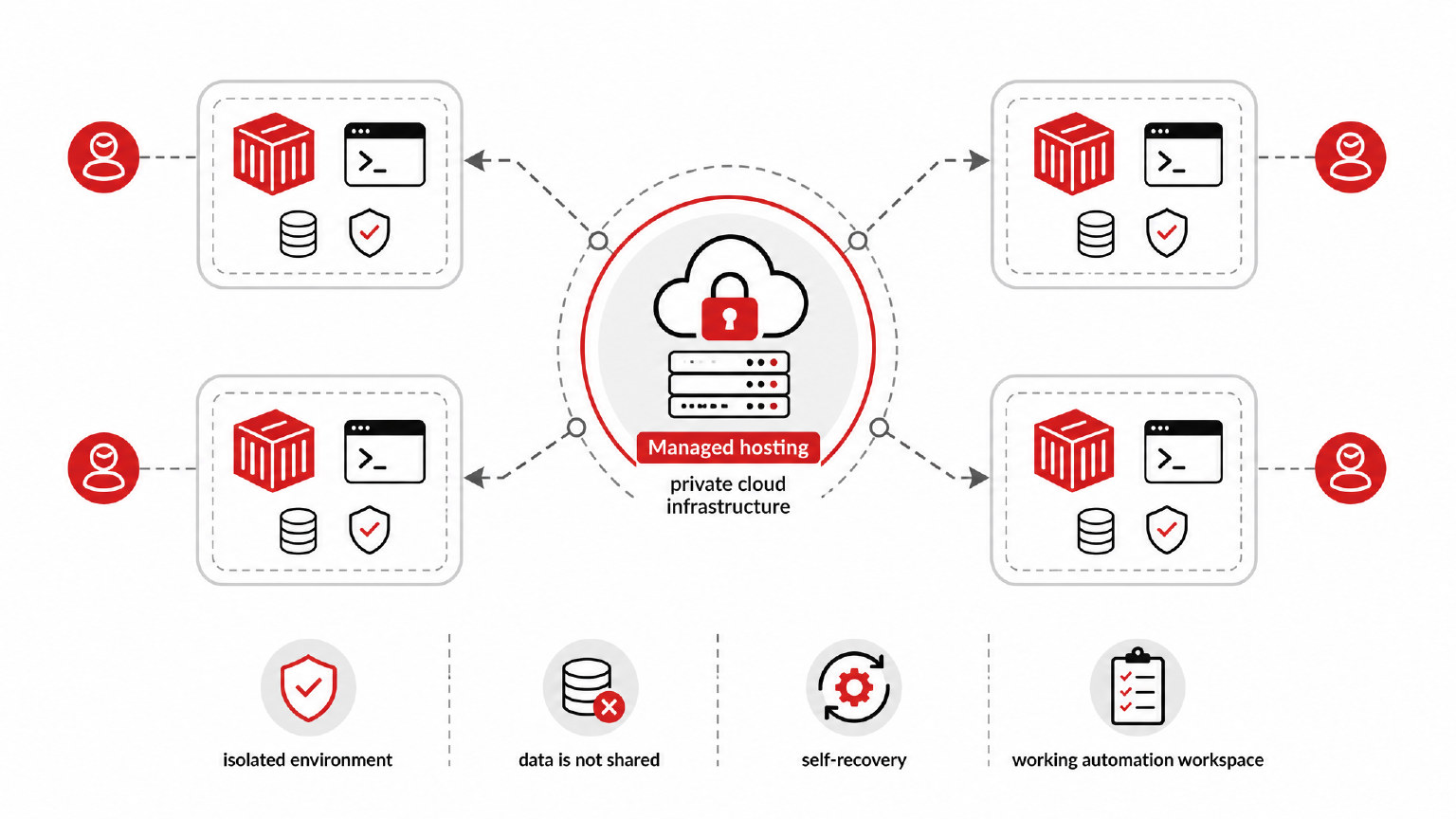
Managed hosting changes the responsibility model. Instead of maintaining a local runtime, you use an OpenClaw instance that is already provisioned on private cloud infrastructure. TryOpenClaw handles the environment so each agent can run in its own separate space rather than sharing a messy local setup.
That separation matters for stability and data handling. The website emphasizes that each agent runs in an isolated environment and that data is not shared with other systems. For teams and builders, this is a practical benefit: you can test workflows with less concern that one agent’s runtime state will interfere with another task.
TryOpenClaw also highlights self-recovery when issues occur. That does not remove the need to design good workflows, but it does reduce the amount of infrastructure debugging you need to do before you can evaluate whether OpenClaw fits your use case. For many users, the managed path turns OpenClaw from an install project into a working automation workspace.
Choose Docker for control and TryOpenClaw for speed
The practical choice is not “Docker or no Docker” in the abstract. It is control versus speed. If you need full control over the runtime, deployment policy, network rules, internal security process, or custom infrastructure, self-hosting with Docker can make sense. You accept the setup work because the control is valuable.
If you want to start using OpenClaw quickly, TryOpenClaw is the shorter route. The managed instance is designed to be available in about 2 minutes, with no local installation, no Docker configuration, and no API key requirement on the mentioned plans. That is useful when the next step is testing real agent work rather than proving that your machine can run the stack.
| Path | What you handle | When it fits |
|---|---|---|
| Self-host with Docker | Runtime, ports, dependencies, updates, recovery | You need infrastructure control and can maintain it |
| Use TryOpenClaw | Workflow design and agent tasks | You want a ready OpenClaw instance without local setup |
For many developers, the right first step is to remove setup from the evaluation. If OpenClaw proves useful for your automation work, you can still decide later whether deeper self-hosted control is worth the extra maintenance.
Check these before deciding how to run OpenClaw
Before choosing a path, start with the outcome you need. If today’s goal is to learn OpenClaw, test agents, or automate a workflow, a managed environment keeps the path short. If today’s goal is to integrate OpenClaw into a controlled infrastructure stack, Docker may be part of the right plan.
Use this quick check before you commit:
- Do you need to change low-level runtime behavior, networking, or storage?
- Do you have time to debug local port conflicts and dependency issues?
- Will someone maintain updates and recovery after the first install?
- Is your priority testing agents for programming, data analysis, research, content, or community workflows?
- Do you want to avoid managing API keys during early evaluation?
If most answers point to infrastructure control, self-hosting is reasonable. If most answers point to speed, testing, and less operational work, TryOpenClaw fits the use case better.
FAQ
What are the basic prerequisites for self-hosting OpenClaw?
You generally need Docker running, suitable local or server resources, available ports, compatible dependencies, and a plan for configuration, updates, logs, and restarts. The exact checklist depends on the OpenClaw version and the way you deploy it.
How does managed hosting skip Docker?
Managed hosting runs OpenClaw for you on cloud infrastructure, so you do not install Docker or manage containers locally. With TryOpenClaw, your instance is provisioned before you start assigning work to agents.
When does self-hosting still make sense?
Self-hosting fits when you need direct control over infrastructure, runtime settings, internal policies, or custom deployment processes. It is a good choice when your team is ready to maintain the environment, not just use the agents.
Can I start with managed hosting and move to self-hosting later?
Yes, that can be a practical evaluation path. You can first test whether OpenClaw supports your workflows, then decide whether running your own infrastructure is worth the extra work.
Do TryOpenClaw plans require my own AI API key?
The Free and Starter plans described by TryOpenClaw include free AI tokens and do not require an API key. Check the current plan details before you choose a subscription.
OpenClaw Docker requirements are important if you self-host, but they are not a requirement for every OpenClaw user. If you want full infrastructure control, Docker belongs on your checklist. If you want to start faster, TryOpenClaw gives you a managed private cloud instance so you can focus on agents, workflows, and automation instead of local setup.
Related Posts
OpenClaw browser relay
Install OpenClaw